Handling metadata when using Reaper for mastering
Handling metadata is a crucial step in mastering a record. It serves as an excellent tool for maintaining a well-organized and searchable digital archive, a necessity for any professional mastering studio. Clients often request files years after the process is complete, and proper metadata ensures those files can be easily located.
Beyond archiving, missing or incorrect metadata poses significant challenges for digital distribution. Furthermore, despite the dominance of streaming, CDs remain a vital part of the music industry. CD-TEXT has always been a valued feature for musicians, making the accurate printing of metadata to DDP master files a standard requirement.
One of the key reasons I love using Reaper for mastering is its ability to handle every task within a single project: audio processing, sequencing, and exporting. This centralization allows me to store a release’s metadata directly in the timeline and automate the export process.
The primary way I manage this is by attaching metadata directly to Regions.
Why Regions?
Working with regions in Reaper makes perfect sense for mastering, especially when dealing with time-constrained audio like a single song, an album, or movements in a classical piece.
Even for a gapless record, regions help visualize where specific parts begin and end. They allow you to jump between sections instantly and make cuts to process sections separately if needed—even if you ultimately export everything as a single continuous file.
The Metadata Template
I took a cue from Reaper's built-in system designed for DDP export and developed a standard region naming template.
#TITLE=Title|PERFORMER=Artist|COMPOSER=Composer|LYRICIST=Lyricist|ISRC=PTKNU2600001|VERSION=1|VINYL=A1
My region title template
For each region, I paste this template and edit the fields for that specific track. This allows me to input granular data that can be retrieved later using wildcards during the render process.
Breakdown of Fields
- Standard Fields: TITLE, PERFORMER, COMPOSER, LYRICIST, and ISRC are self-explanatory standard tags.
- VERSION: This is used internally. If a track undergoes revisions, I can easily trace the version number in the filename.
- VINYL: Since I frequently master for vinyl, this field allows me to designate sides (e.g., A1, A2, B1, C4). For streaming the region ID determines track ordering (1, 2, 3...) but for vinyl releases I extract the wildcard from this field to determine sequencing on the physical medium.
This approach ensures that separate sequencing for digital and vinyl releases is always saved within the project architecture.
Global Release Metadata
While region metadata handles track-level details, I also need fields for the entire release (e.g., Album Artist, Album Title).
I store this in the Project Settings:
- Go to File > Project Settings.
- Click the Notes tab.
- Fill in the "Title" (Album Name) and "Author" (Album Artist) fields.
Exporting Digital Files
Once the regions are named, the next step is instructing Reaper to use that text as metadata.
In the Render to File window:
- Toggle on the Metadata... option.
- Use wildcards to map your region data to ID3/WAV tags.
- For example, to map the Track Title, you would use: $region(#TITLE)[|]
Note on Syntax: The [|] at the end of the wildcard tells Reaper to stop reading at the pipe character | used in our region template.
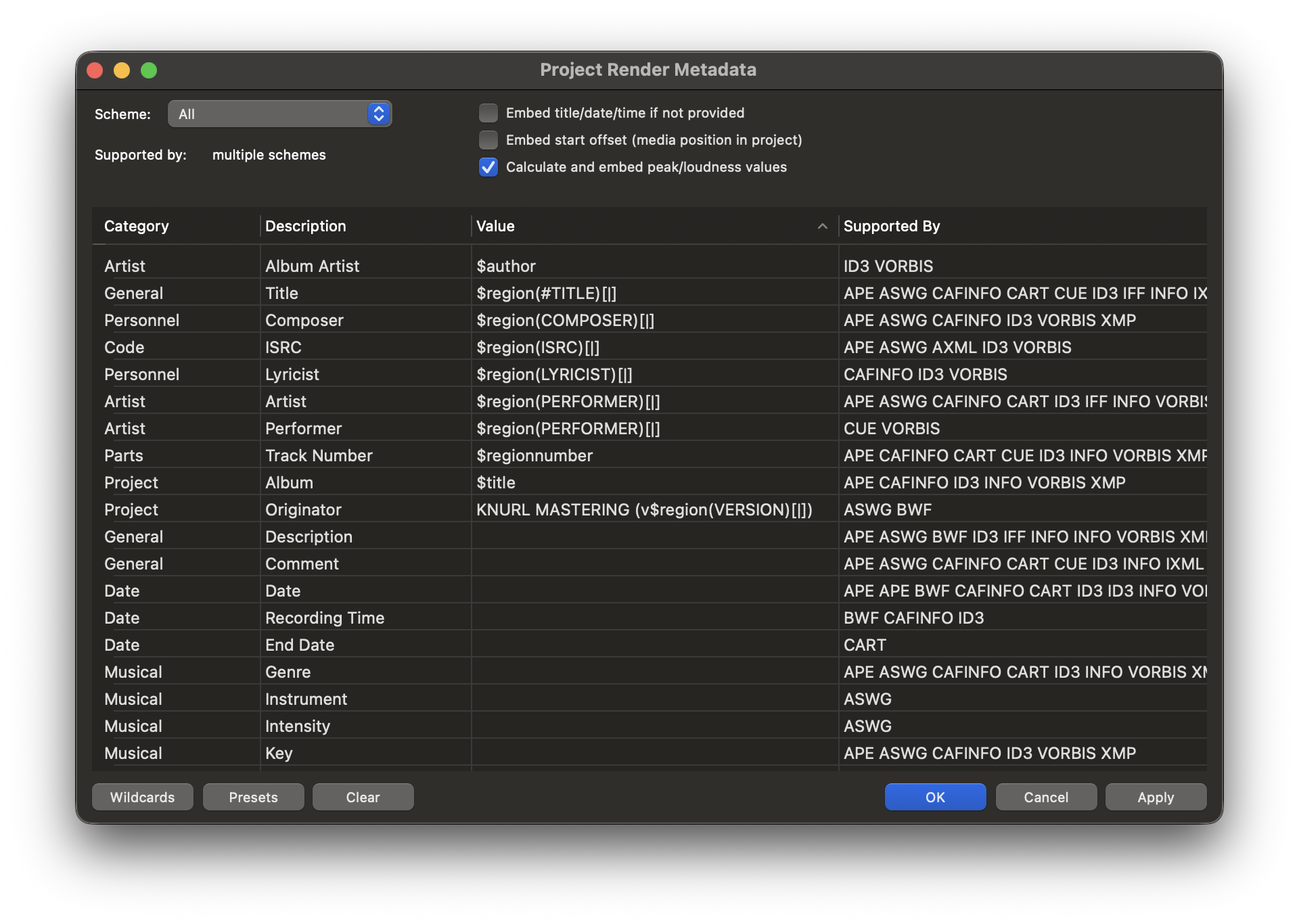
Reaper Render Metadata window with the wildcards template we currently use at Knurl Mastering.
File Naming Pattern
I also use these wildcards for the actual filenames. Our studio's standard naming pattern looks like this:
$region(PERFORMER)[|] - $regionnumber $region(#TITLE)[|] v$region(VERSION)[|]
This automatically generates filenames like: Artist Name - 01 Song Title v1.wav
Handling DDPs and CD-TEXT
While the system above works perfectly for digital files, Audio CDs (DDP images) require a specialized approach. DDPs rely on specific markers to identify track start points, indices, and CD-TEXT.
Reaper has native DDP support, but manually placing markers and typing out metadata for them is tedious and prone to error. Fortunately, Reaper allows for scripting.
I wrote a Lua script that automates this entire process. It reads your Region names (which you've already formatted), cleans up special characters, and converts them into the specific markers required for a valid DDP.
This script does two main things:
- Converts Regions to Markers: It maps your region starts to track markers (#) and handles the special start (!) and end (@) markers required by the DDP standard.
- Sanitizes Text: CD-TEXT is very strict about character sets (ASCII). The script automatically transliterates characters like “ç” to “c” or “ñ” to “n”. While not linguistically perfect, it prevents CD players from displaying garbage characters or rejecting the text entirely.
--[[
* ReaScript Name: Convert Regions to DDP Markers
* Description: Creates DDP markers (!, Tracks, @) with full metadata integration and text sanitization.
* Author: Knurl Mastering
--]]

local is_new_value, filename, section_ID, command_ID, mode, resolution, val = reaper.get_action_context()

-----------------------------------------------------------
-- 1. TOOLBAR FLASH LOGIC
-----------------------------------------------------------
local flash_duration = 0.1
local start_time = 0

function MonitorFlash()
	local now = reaper.time_precise()
	if now - start_time < flash_duration then
		reaper.defer(MonitorFlash)
	else
		reaper.SetToggleCommandState(section_ID, command_ID, 0)
		reaper.RefreshToolbar2(section_ID, command_ID)
	end
end

function TriggerFlash()
	reaper.SetToggleCommandState(section_ID, command_ID, 1)
	reaper.RefreshToolbar2(section_ID, command_ID)
	start_time = reaper.time_precise()
	MonitorFlash()
end

-----------------------------------------------------------
-- 2. TEXT SANITIZATION
-----------------------------------------------------------
local replacements = {
	["á"]="a", ["à"]="a", ["ã"]="a", ["â"]="a", ["ä"]="a", ["å"]="a",
	["é"]="e", ["è"]="e", ["ê"]="e", ["ë"]="e",
	["í"]="i", ["ì"]="i", ["î"]="i", ["ï"]="i",
	["ó"]="o", ["ò"]="o", ["õ"]="o", ["ô"]="o", ["ö"]="o",
	["ú"]="u", ["ù"]="u", ["û"]="u", ["ü"]="u",
	["ç"]="c", ["ñ"]="n", ["ý"]="y",
	["Á"]="A", ["À"]="A", ["Ã"]="A", ["Â"]="A", ["Ä"]="A", ["Å"]="A",
	["É"]="E", ["È"]="E", ["Ê"]="E", ["Ë"]="E",
	["Í"]="I", ["Ì"]="I", ["Î"]="I", ["Ï"]="I",
	["Ó"]="O", ["Ò"]="O", ["Õ"]="O", ["Ô"]="O", ["Ö"]="O",
	["Ú"]="U", ["Ù"]="U", ["Û"]="U", ["Ü"]="U",
	["Ç"]="C", ["Ñ"]="N", ["Ý"]="Y"
}

function sanitize_text(str)
	if not str then return "" end
	-- Step A: Replace accented chars
	for k, v in pairs(replacements) do
		str = string.gsub(str, k, v)
	end
	-- Step B: Allow # = | and standard punctuation
	str = string.gsub(str, "[^%w%s%-%_%.%,%!%?%'%\"%(%)%#%=%|]", "")
	return str
end

-----------------------------------------------------------
-- 3. METADATA HELPERS
-----------------------------------------------------------
function get_project_title()
	local retval, title = reaper.GetSetProjectInfo_String(0, "PROJECT_TITLE", "", false)
	if retval and title ~= "" then
		return sanitize_text(title)
	else
		return "Unknown Album"
	end
end

function get_project_author()
	local retval, author = reaper.GetSetProjectInfo_String(0, "PROJECT_AUTHOR", "", false)
	if retval and author ~= "" then
		return sanitize_text(author)
	else
		return "Unknown Artist"
	end
end

function create_colored_marker(pos, name, id)
	-- Dark Grey (64, 64, 64)
	local r, g, b = 64, 64, 64
	local color = reaper.ColorToNative(r, g, b) | 0x1000000

	reaper.AddProjectMarker2(0, false, pos, 0, name, id, color)
end

-----------------------------------------------------------
-- 4. MAIN LOGIC
-----------------------------------------------------------
function main()
	-- CHECK: Do regions exist?
	local ret, num_markers, num_regions = reaper.CountProjectMarkers(0)
	if num_regions == 0 then return end

	TriggerFlash()
	reaper.Undo_BeginBlock()

	local i = 0
	local regions_to_process = {}
	local last_region_end = 0

	-- LOOP: Gather all Regions
	while true do
		local retval, isrgn, pos, rgnend, name, markrgnindexnumber = reaper.EnumProjectMarkers(i)
		if retval == 0 then break end

		if isrgn then
			table.insert(regions_to_process, {
				pos = pos,
				name = name,
				id = markrgnindexnumber
			})

			-- Find the absolute end of the album
			if rgnend > last_region_end then
				last_region_end = rgnend
			end
		end
		i = i + 1
	end

	-- A. CREATE START MARKER (ID 99)
	create_colored_marker(0, "!", 99)

	-- B. CREATE TRACK MARKERS
	for _, rgn in ipairs(regions_to_process) do
		local clean_name = sanitize_text(rgn.name)
		create_colored_marker(rgn.pos, clean_name, rgn.id)
	end

	-- C. CREATE END MARKER
	-- Format: @ALBUM|PERFORMER=Artist
	local album_title = get_project_title()
	local album_artist = get_project_author()
	local end_marker_name = "@" .. album_title .. "|PERFORMER=" .. album_artist

	-- ID: Number of Regions + 1
	local end_marker_id = num_regions + 1

	create_colored_marker(last_region_end, end_marker_name, end_marker_id)

	reaper.Undo_EndBlock("Create DDP Markers", -1)
end

main()